
Appearance
GCC and UAE Localisation
Companies in the Gulf (UAE, Saudi Arabia, Qatar, Oman, Kuwait, Bahrain) work with their own rules: FIDIC contract forms, Arabic / English documents, VAT on the full value of the work, sometimes Hijri dates. Two packs adapt the Construction app to them. They install automatically when the company is in a GCC country, so most of this chapter is about checking the settings and knowing what changes on your contracts, certificates and invoices.
| Pack | For | What it adds |
|---|---|---|
| Construction - GCC | All GCC countries | FIDIC contract forms, Arabic / English payment certificates and BOQs, Hijri dates, retention and advance accounts, VAT-friendly retention booking |
| Construction - United Arab Emirates | UAE companies (UAE chart of accounts) | Links the GCC pack to the UAE accounting: VAT 5% on the full value of the work, retention and advance accounts in the UAE chart |
EXAMPLE USED IN THIS CHAPTER
The screenshots come from AE Company, a UAE company of the demo database (currency AED, UAE chart of accounts), with the project [JVT] Jumeirah Village Townhouses for the client Al Barsha Real Estate Development LLC in Dubai. To work in another company, use the company switcher at the top right (see Switch company).
Settings to check
Open , with the right company selected at the top right. The settings below are per company (building icon).
In the Standards block:
Setting What it does GCC Formatted Invoices Prints invoices, payment certificates and estimate BOQs in Arabic and English. Tick it for bilingual documents. Hijri Dates on Construction Documents Prints the Hijri (Umm al-Qura) date next to the date of the payment certificates. Ticked by default for Saudi companies only. It needs the hijridate Python library on the server; if it is missing, a warning appears under the setting and no Hijri date is printed. 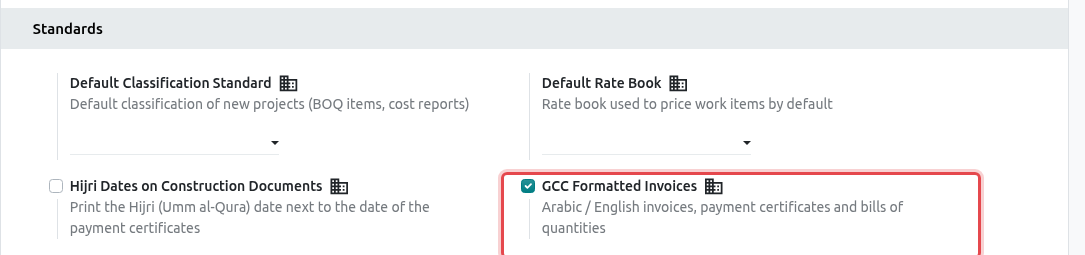
AE Company: GCC Formatted Invoices is ticked. In the Contracts block, check the four accounts. In a GCC chart of accounts they are created automatically (with Arabic names): Retention Receivable, Retention Payable, Advances from Customers and Advances to Contractors. Change them only if your accountant uses other accounts. Also set the Default Retention (%) and Default Retention Limit (%) of new contracts.
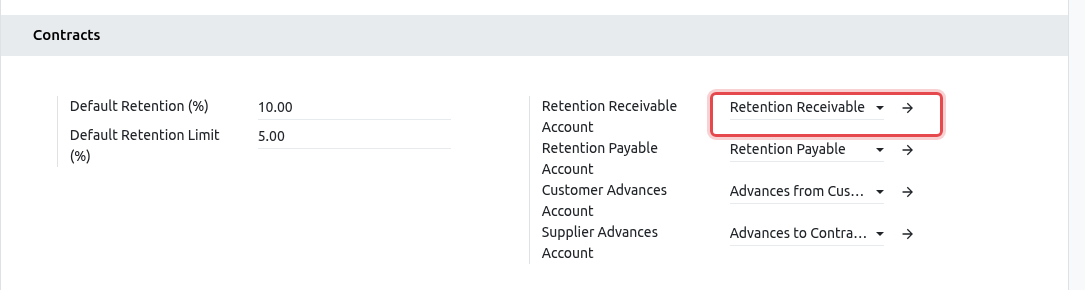
The retention and advance accounts of AE Company. Click Save.
FIDIC contract forms
Most Gulf contracts use the FIDIC conditions of contract (the international standard forms of the "Red", "Yellow" and "Silver" books). On a contract, the field Conditions of Contract says which form applies:
- FIDIC Red Book 1999 or 2017 (Construction: the client designs, you build);
- FIDIC Yellow Book 1999 or 2017 (Plant and Design-Build);
- FIDIC Silver Book 1999 or 2017 (EPC / Turnkey);
- Other / Bespoke (default).
Create the contract as usual (see Contracts) and choose the Conditions of Contract while it is in Draft. It cannot be changed after activation.
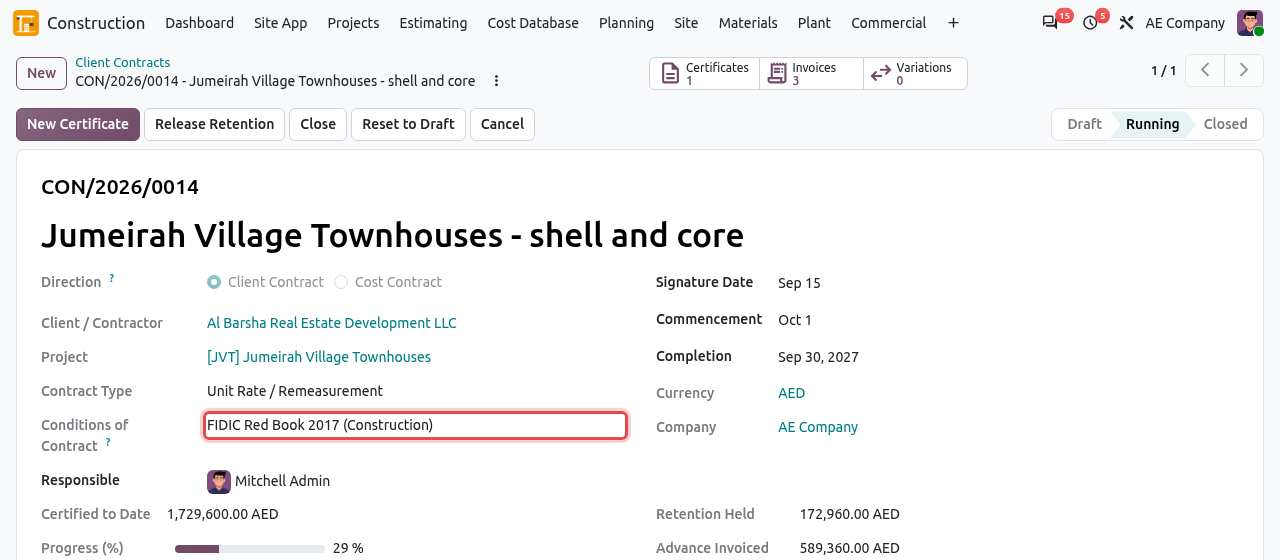
A client contract under the FIDIC Red Book 2017. When you choose a FIDIC form, Odoo fills in the Payment Terms tab with the FIDIC defaults:
Field FIDIC default Meaning Advance Recovery (%) 25 Each certificate repays 25% of its value until the advance is recovered (Sub-Clause 14.2). Recovery Starts at (%) 10 Repayment starts once the work certified exceeds 10% of the contract value. Payment Terms FIDIC Interim Payment (56 days) Payment due 56 days after the Engineer receives the statement (Sub-Clause 14.7). These are only defaults: check them against the Particular Conditions and the Contract Data of your contract, and change them before activation if they differ. Enter the Advance (%) and the Retention (%) of the contract.
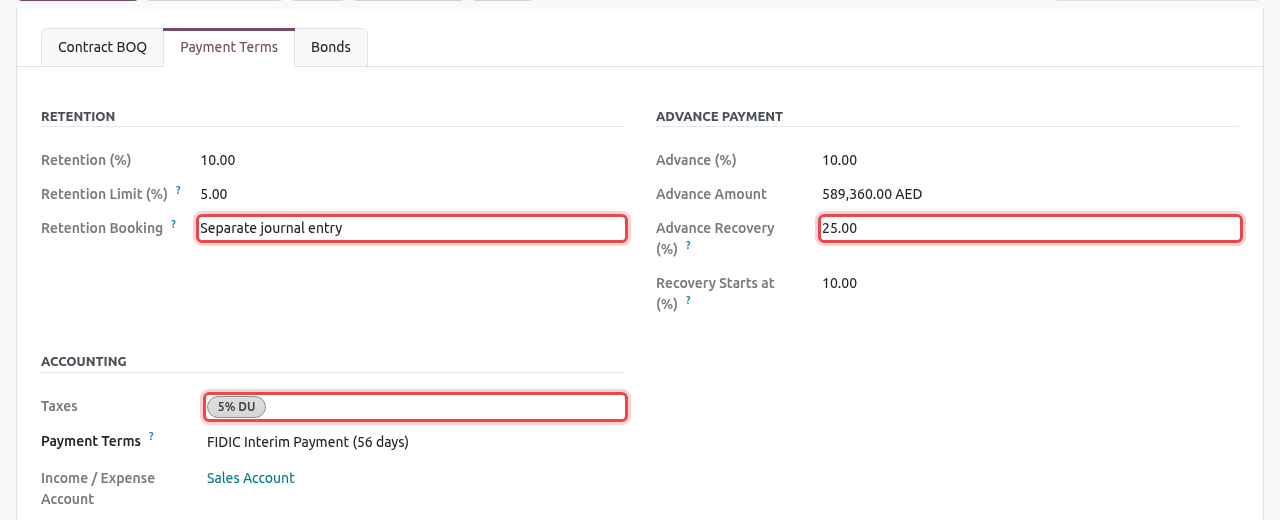
The Payment Terms tab: retention booked as a separate journal entry, FIDIC advance recovery, VAT 5% (5% DU).
TIP
In the contract list, use Group By → Conditions of Contract to see your contracts by form. On the printed payment certificate of a FIDIC contract, the last signature box reads Certified by the Engineer.
VAT 5% and retention
In the GCC, VAT is due on the full value of the work certified, including the part the client keeps as retention. For this reason, contracts of GCC companies use the Retention Booking = Separate journal entry by default:
- the invoice of the certificate shows the full work done of the period, minus the advance recovery, with VAT 5% on that amount;
- when the invoice is posted, Odoo creates a separate journal entry that moves the retention from the client balance to the Retention Receivable account;
- the amount the client must pay now is the invoice total minus the retention. The retention is invoiced later with Release Retention on the contract.
Example with certificate CON/2026/0014/IPC-01 of AE Company:
| AED | |
|---|---|
| Work done this period | 1,729,600.00 |
| Less advance recovery (25%) | -285,060.00 |
| Untaxed amount of the invoice | 1,444,540.00 |
| VAT 5% | 72,227.00 |
| Invoice total | 1,516,767.00 |
| Less retention 10% (separate entry) | -172,960.00 |
| Amount due now | 1,343,807.00 |
The certificate itself shows the work done, the retention and the advance recovery, and the Net Amount Due before VAT.
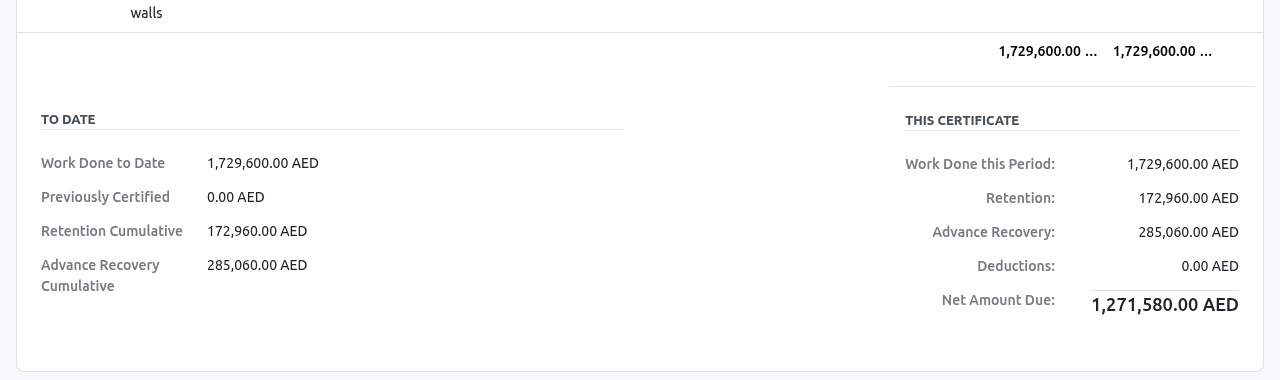
The amounts of certificate IPC-01. The invoice (smart button Invoice of the certificate) has VAT 5% on the work done less the advance recovery. After posting, the retention appears as already settled ("Paid on...") and the Amount Due is the amount to collect now.
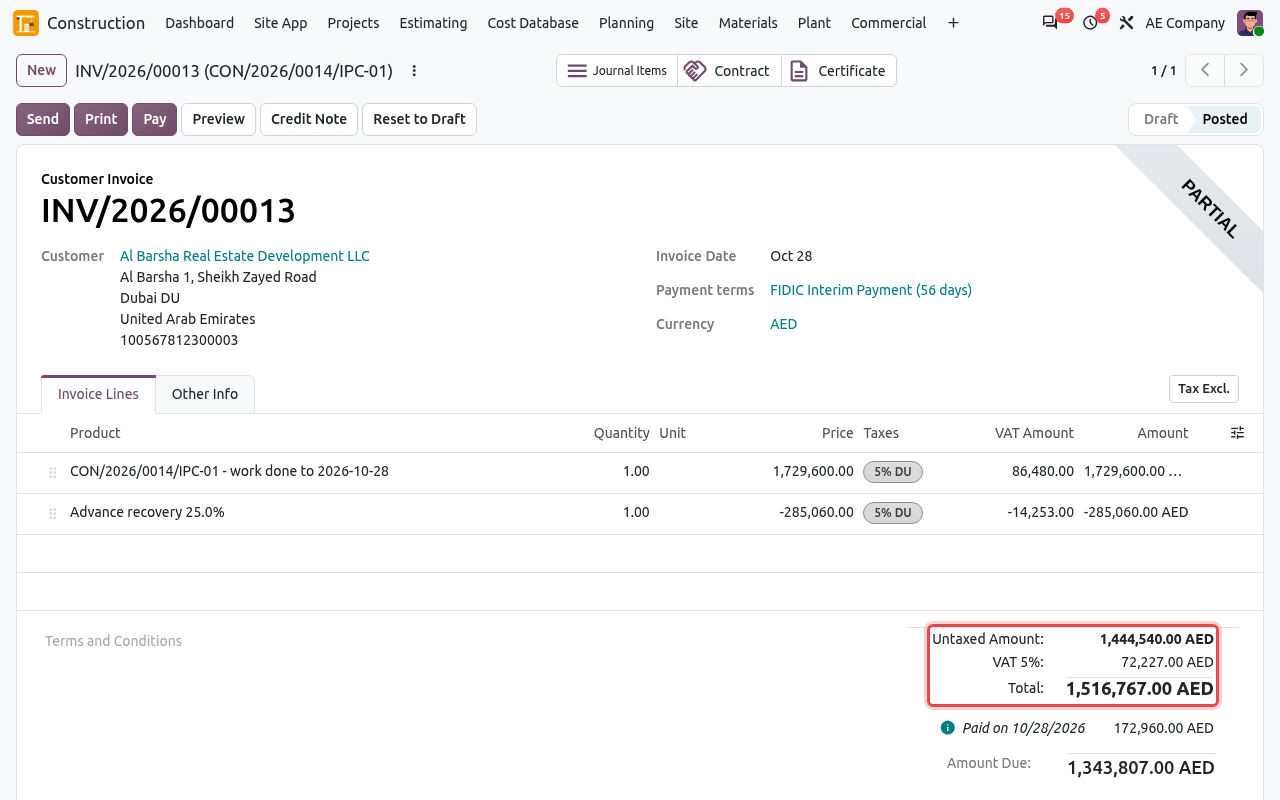
Invoice INV/2026/00013: VAT 5% on 1,444,540 AED; 172,960 AED of retention moved to the retention account. The retention entry is a miscellaneous journal entry linked to the contract and to the certificate.
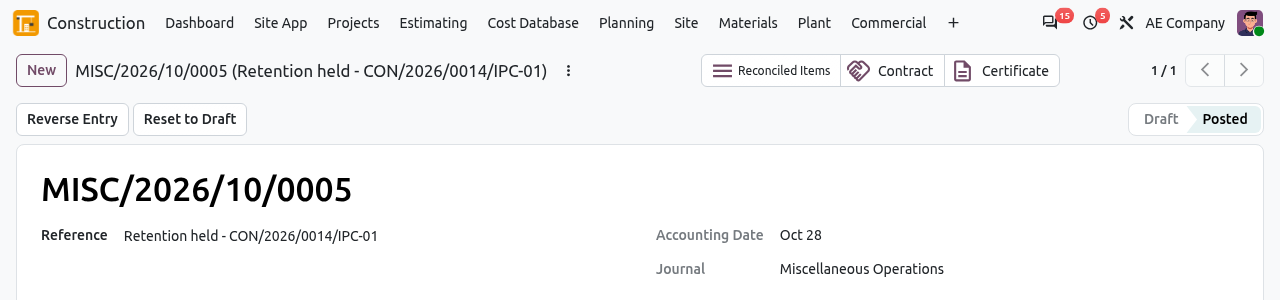
The entry Retention held - CON/2026/0014/IPC-01.
SET THE EMIRATE OF THE CLIENT
In the UAE chart, the VAT taxes are per emirate (5% DU for Dubai, 5% AZ for Abu Dhabi...). Odoo chooses the right one with the State (emirate) of the client's address. If the State is empty, the invoice gets no VAT. Always fill in the full address of the client (State = the emirate) before creating the first invoice of the contract.
ADVANCE PAYMENT
The advance payment invoice (button on the contract) also carries VAT 5%. The VAT is then reduced on each certificate by the advance recovered, as shown above.
Arabic / English documents
With GCC Formatted Invoices ticked, the payment certificate, the estimate BOQ and the invoices print every heading in both languages. The main language is the language of the client (set on the contact): an English client gets English with Arabic underneath; an Arabic client gets Arabic with English underneath.
Open the payment certificate and click the gear (⋮) menu → Print → Payment Certificate.
The PDF has the bilingual title (Interim Payment Certificate / شهادة دفع مرحلية), column headings and summary lines.
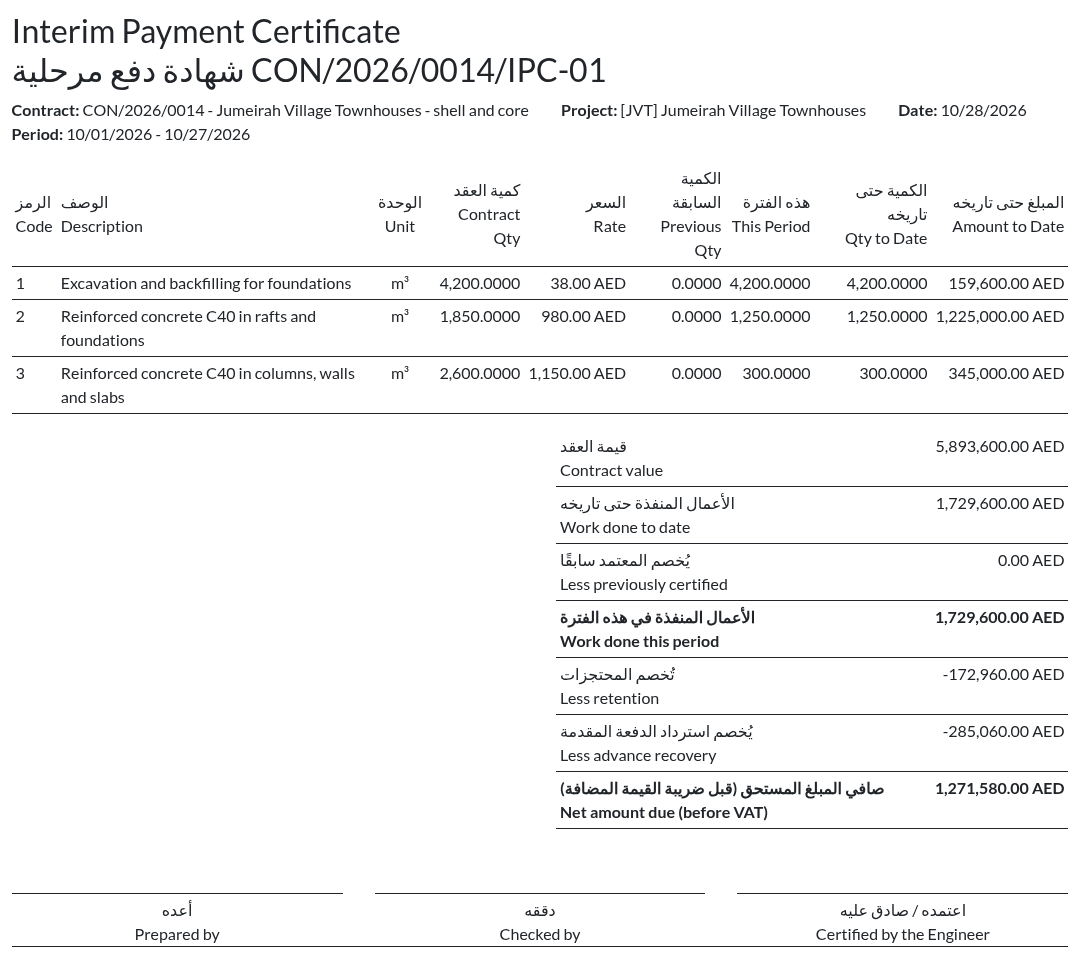
The Arabic / English payment certificate of AE Company (the letterhead is cut off in this picture).
Hijri dates
When Hijri Dates on Construction Documents is ticked (Saudi companies by default), the payment certificate prints the Hijri date after the Gregorian date, in the form 10/28/2026 (dd/mm/yyyy هـ). Your IT administrator must install the hijridate Python library on the Odoo server; without it, the setting shows a warning and the date is printed in the Gregorian calendar only.
E-invoicing
Payment certificates, advance payments and retention releases become standard Odoo invoices. They therefore follow the UAE e-invoicing format of Odoo when it is enabled, like any other invoice. Ask your accountant to check the advance deduction lines once e-invoicing is live.