
Appearance
Skip to content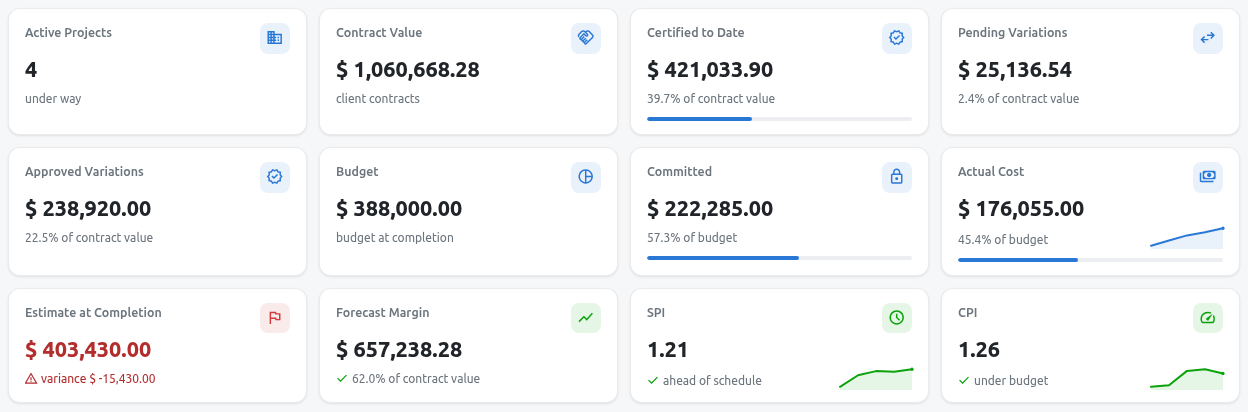
The Construction dashboard, showing contract, cost and schedule figures across all projects.
Construction for Odoo 20 · User guide
From the first estimate to the final payment certificate.
Step-by-step instructions, with a screenshot for each step, for running construction projects in Odoo. No prior Odoo experience needed.
Start from your role
- AdministratorSet up the app and user rightsConfigurationTeams & approvals
- EstimatorPrice the BOQ and submit tendersCost databaseEstimating
- PlannerSchedule, baselines and progressPlanning
- Site engineerDaily reports, crews, material requestsDaily site reportsSite appMaterials
- Quantity surveyorContracts, certificates, variationsContractsPayment certificatesVariations
- QA/QCInspections, NCRs, snags, testsQuality
- HSE officerIncidents, permits, inductions, PPEHSE
- Document controllerDrawings, RFIs, submittals, transmittalsDocuments
Contents
The chapters follow the life of a project: set up once, win the job, plan and build it, get paid, then hand it over.
01Getting started
- IntroductionHow Odoo screens work, user roles, and the sample projects used in this guide.
- DashboardProgress, money, risks, quality and safety of all projects on one page.
02Setup
- ConfigurationCompany type, default standards, retention and advance accounts, codes.
- Teams, roles & approvalsWho can do what, project teams, and approval rules.
03Pre-construction
- Construction projectsThe job you build, and the centre of every other record.
- Cost databaseResources, rate books and work items: your price library.
- EstimatingImport the client BOQ, price it, and submit the tender.
04Planning & site
- PlanningActivities, Gantt chart, baselines and the weekly S-curve.
- Daily site reportsThe site diary: labour, work done, plant, weather, delays.
- Mobile site appThe daily site jobs behind big buttons, for phones and tablets.
- MaterialsFrom material request to purchase, delivery, store and issue.
- Plant & equipmentOwned and hired machines, allocations, hour meters, certificates.
05Commercial
- Contracts & bondsClient and cost contracts, payment terms, retention, bonds.
- Payment certificatesMonthly measurement, certification and invoicing.
- Variations & claimsPrice, approve and certify changes to the contract.
- SubcontractingSubcontract packages, work orders and subcontractor certificates.
- Cost controlBudget against actual and committed cost, forecast and earned value.
06Documents, quality & safety
- DocumentsDrawings and revisions, transmittals, RFIs and submittals.
- QualityITPs, inspection requests, NCRs, snags and material tests.
- Health, safety & environmentIncidents, observations, permits to work, inductions, PPE.
- Labour campsCamps, rooms and beds, worker allocation and the mess.
07External parties & group
- Construction portalWhat clients, consultants and subcontractors do online.
- Inter-company projectsWhen one company of the group works for another.
- GCC & UAE localisationFIDIC forms, Arabic documents, VAT and Gulf practice.